After making the post about smooth corners in Firefox 3 yesterday, I began to wonder what other smoothnesses (which should be a word) the next version of Firefox might have in store.
As I mentioned yesterday, the Cairo graphics library will power the rendering of web pages in Firefox. Functions such as resizing an image, are now performed by this new library.
In current web browsers, if you have an image that is 100 pixels by 100 pixels, but you tell the browser to resize it to 85×85px (by specifying the height and width in the HTML <img> tag), the results were ugly. The browser would resize the image, but not with any of the smoothness that you would see if you had resized the image in an application like Photoshop or the Gimp.
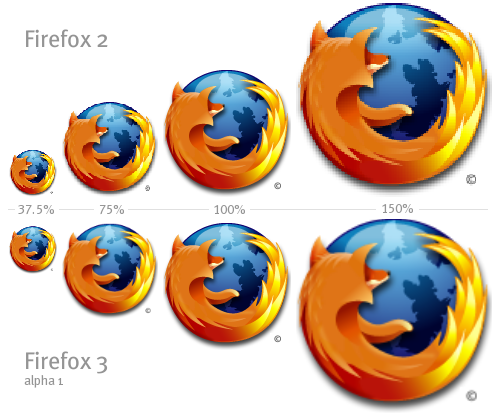
Now, in Firefox 3.0 Alpha 1, resizing an image like this actually produces a smoothly size image. This isn’t something I would recommend doing, but it is another nice example the improvements coming in the Firefox rendering engine.
Here’s an example of a PNG image version of the Firefox logo. There is only one source image used for all of these variations. This source image is 128 pixels by 128 pixels. The top row shows how Firefox 2 resizes the image, and the bottom row shows how it’s done in Firefox 3.0 Alpha 1.
I had the good fortune of meeting Carl Worth, a lead Cairo developer, a few years ago in Boston. He was a gentlemen and was more enthusiastic about tessellation than anyone I’ve ever met. It’s nice to see his hard work will be helping to improve such a widely adopted application as Firefox.
When a developer of a mapping application was considering a lower-quality view to make his maps render faster, Carl suggested that if Cairo was too slow, then it should be fixed, not worked-around. I understand that they’ve since made good progress on performance.
Smonkin’
Of course, this only affects Firefox on Windows (and Linux, I guess) – on the Mac it already smoothly scales images
Ah, it’s like a mac!
I think it’s about time this kind of scaling has been implemented – However not suggesting that images should be scaled like that in a web page, they should of course be made to fit.
Other graphical implementations in Firefox 3 seem exciting too, but there’s still the problem of cross-browser…
Nice.
Are there any reasons apart from other browsers that means you shouldn’t use this?
Looks lovely.
Awesome stuff. I’ve always been wondering why browsers are scaling images (not only inside a page, but when you’re viewing an image alone too) so… crappily (at least on Windows that is).
Nice that there’s going to be a change — though it’s still long to release.
> In current web browsers… the results were ugly
Smooth image resizing has been part of Opera for a long time already 🙂
Nice to see it in Firefox at last…
🙂
Is anyone aware of a javascript solution to obtain smooth scaling with the current versions of Firefox-PC and IE-PC? As noted above, Firefox already does this correctly on Mac, but not on PC.
I would like to encourage everyone to size “img” elements using “em” units. That way, images and text will scale together. Pages will look the same on any display device, regardless of screen size and pixel density. A real world example of scale-invariant layout is http://www.inasinglestroke.com/
That’s pretty sweet:) Can’t wait til Firefox 3 comes:)
You have spam in the comment above this one. Hopefully you’ll get a notification about this new comment!
I’ve developed a solution that should work for most browsers (supporting JavaScript and Flash).
You can read about it here:
http://www.stainlessvision.com/smooth-image-scaling
It’s not ready for a usable release yet – keep an eye out for something soon though.
Cool, that’s a nice new feature to add.
Is there a way to disable this and go back to the sharp scaling method?
Hi, thank you for the good news. But I think the example image is not the best.
It is much more impressive if you use a black and white PNG file which
contains thin lines.
Pity to see this smooth scaling gone ugly again in FF3.0b5
And I mean UGLY.
This looks awesome, but I’ve just downloaded FF3 RC2 on a Win2000 machine and images seem OK, but the way it renders text is horrific. It actually makes it very difficult to read some fonts like Times New Roman with all those serifs! FF2 seems to handle fonts much better.
I’m echoing Miranda. I work in content that’s based on pixel perfect details, with resizing a necessary demon, and I need a way to go back to the old method of scaling. Is there a solution if FF3’s menus or config page?
Indeed. For the pixel lovers this is an unwanted feature, and should simply be configurable.
Echoing Greg echoing Miranda. I build http://sim.urbandead.info about 2 months ago, and it makes extensive use of “blocky” up-scaling as a useful design element. Indeed, its an ideal method for me, as I’m literally representing a grid based game map. “Smooth” (resampled) scaling totally wrecks my design, and I’d be very happy to know if there is a CSS attribute I can add to images to force non-resampled image scaling. Otherwise I’ll have to actually host (and distibute) larger images- not a huge deal normally, but my images a dynamically generated via PHP and the code to make / modify bigger images will be more complex, and execute more slowly.
I second Greg, Miranda and Seb 🙂 and i desperately want to know how to disable the smooth rendering in firefox3.
Does anyone know if it is possible to get firefox3 to render pictures
like firefox2 did ?
The best solution I can come up with is to make your images BIGGER than you will ever need, and then scale them down. This is tricky, because the scaling must always give an image where there are no factional pixles. For example, if you want to show an image at 10px, but also 20px and 30px and 40px and 50px, you need to have a “master” that is 600px. In short, your desired display dimensions all need to be factors of your “master” dimensions.
Obviously this leads to some large images (dimension wise), but fortunately png and gif compression shrinks this kind of pixel art down to about the same file size regardless of image scale.
Its still a big pain in the ass- you’d have to go through and manually upsize all the images to fix most pixel art sites. Most of my own images are generated from a database (php gd ftw!!11!) and so I could fix it (for future image generations) with just a few extra code lines, but still haven’t bothered. It would be a wretched cludge.
Instead, I know advise visitors that the site is best viewed with any browser EXCEPT Firefox3.
I scale up images on my QR Code Generator and FF 3 makes them look very bad 🙁
Will investigate and talk to the developers, maybe there’s a CSS property to turn it off.
Scaling images in FF3 Looks great, but after having a few very small images resized smaller i really start to lag. A CSS property to disable would be nice.
I’m clearly in a minority here, but I’d rather the image smoothing could be turned off. I’d much rather have the jagged edges than the resulting blurriness.
If I mention right image height and width, then it is okey or not ?
I solved this problem in the meantime by serving Firefox and Safari images of the correct size. Probably not the best way but hey.
If I am not wrong, the resizing problem occurs mostly with gif images. If you re-size a higher resolution pic to a lower one by specifying height and width for a jpg I don’t think you see any problems.